
Smartphones have become such an essential part of our lives that we often forget they’re complex machines running multiple systems behind the scenes. But what happens when something goes wrong — maybe the screen doesn’t respond properly, your microphone feels off, or your battery drains too fast?
That’s where apps like Testy – Test Your Phone come in. Instead of guessing what’s wrong, Testy helps you run quick and detailed checks on your phone’s hardware and software. It’s like having your own mini diagnostics lab — right in your pocket.
Let’s explore how Testy works, what it offers, and whether it’s worth trying if you’re serious about keeping your phone in top shape.
What Is Testy – Test Your Phone?
Testy is a mobile app designed to run diagnostic tests on your Android phone. It helps you check whether different components — like your camera, touchscreen, battery, Wi-Fi, sensors, and more — are working correctly.
Whether you’re buying a used phone, troubleshooting an issue, or just curious about your device’s condition, Testy makes it simple to get clear answers. With just a few taps, you can perform dozens of tests that help identify problems before they get worse.
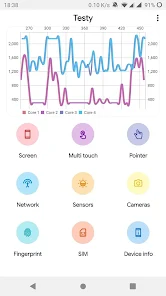
It’s especially handy if your phone starts acting strange and you don’t want to go to a technician right away. Testy gives you a better idea of what’s wrong — and sometimes, even how to fix it.
Testy – Test Your Phone
Using the app is straightforward:
Download the app from the Play Store.
Open it and choose the type of test you want to run — like display, speaker, battery, vibration, and more.
Follow the on-screen instructions for each test — most of them are interactive and easy.
Get a result instantly, letting you know if a component is working properly or needs attention.
Testy doesn’t just show a green tick or red cross. In many cases, it explains the issue and suggests the next steps — making it great for beginners and techies alike.
Features of Testy – Test Your Phone [Completely Detailing]
Here’s a full breakdown of what you can expect from Testy:
| Feature | Description |
|---|---|
| Touchscreen Test | Check for dead zones, pressure issues, or unresponsive areas. |
| Display Test | Detects screen discoloration, dead pixels, and brightness accuracy. |
| Sound & Microphone Test | Tests speaker clarity, microphone input, and earpiece function. |
| Battery Health Check | Shows current health, charge cycles, and estimated lifespan. |
| Camera Test | Runs checks on front and rear cameras, focus, and flash. |
| Sensor Test | Analyzes gyroscope, accelerometer, proximity, light sensor, and compass. |
| Connectivity Test | Verifies Wi-Fi, Bluetooth, mobile data, and GPS strength. |
| Vibration Test | Confirms if your device’s vibration motor works properly. |
| Charging Test | Detects charger type, voltage, and speed of charging. |
| System Info Viewer | Gives detailed hardware and software info, including storage and RAM. |
These tests are essential whether you’re troubleshooting problems, buying/selling a device, or just doing regular maintenance checks.
Pros of Testy – Test Your Phone
| Pros | Details |
|---|---|
| User-Friendly Interface | Simple, clean layout makes testing easy even for beginners. |
| All-in-One Toolkit | Covers all major hardware and system components. |
| No Root Needed | Works on almost all Android phones without root access. |
| Quick & Accurate | Provides real-time feedback within seconds. |
| Free to Use | Most features are available without paying. |
| Great for Second-Hand Devices | Useful for checking old or used phones before purchase. |
Cons of Testy – Test Your Phone
| Cons | Details |
|---|---|
| Ads in Free Version | Some tests show ads, which might be annoying. |
| Limited iOS Support | Mainly designed for Android; not available on iPhones. |
| No Repair Solutions | While it shows issues, it doesn’t fix them — you’ll need a repair shop for that. |
| Might Miss Deep System Bugs | Some deep-rooted software issues may not be detected. |
| Not Always 100% Accurate | Occasional false positives or unclear results for complex issues. |
Testy – Test Your Phone Alternatives [Use Table]
If you’re exploring other diagnostic tools, here are some alternatives to consider:
| App Name | Platform | Special Features |
|---|---|---|
| Phone Doctor Plus | Android/iOS | Over 30 test tools, great UI, battery tracking |
| Device Info HW | Android | Focuses on detailed hardware specs |
| TestM | Android/iOS | Offers repair center locator and full diagnostics |
| Phone Check and Test | Android | Advanced testing, including CPU, memory, and thermal checks |
| CPU-Z | Android | Hardware-focused tool for internal performance insights |
Each app offers slightly different strengths. Some focus more on visual tests, while others dive deep into system performance.
Final Thoughts – Should You Use Testy?
Absolutely — especially if you’re someone who likes to stay ahead of tech issues or wants peace of mind when using or buying a device. Testy – Test Your Phone offers a fast, friendly, and helpful way to check your phone’s health, even if you’re not tech-savvy.
Instead of waiting for a problem to get worse or spending money on unnecessary repairs, you can use Testy to figure out what’s really going on with your device. It’s simple, safe, and most importantly, gives you control.