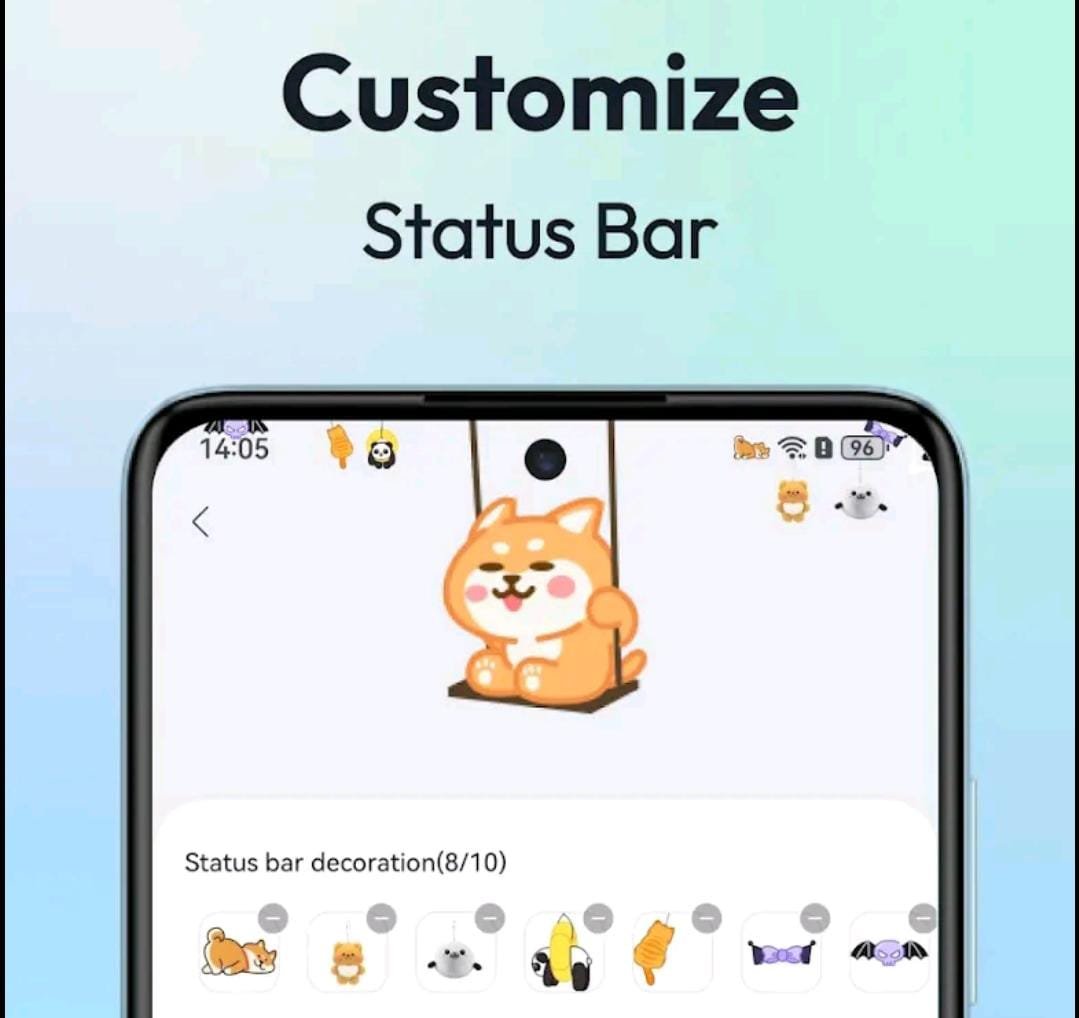

Smartphone customization has become more than just changing wallpapers. Today, users want unique visual elements that make their devices stand out. One growing trend is the ability to customize status bar hanging emoji — a small visual element that appears to hang from the top status bar of your phone.
If you want your device to look modern, stylish, and personalized, this guide will explain everything you need to know in a clear and practical way.
What Is a Status Bar Hanging Emoji?
A status bar hanging emoji is a small animated or static graphic placed near the top of your screen, typically around the status bar area where battery percentage, network signal, and time are displayed.
It creates the illusion that the emoji is “hanging” from the top of the screen, adding a playful or aesthetic touch without changing the core system interface.
This feature is more common on Android devices because Android allows deeper user interface customization compared to iOS.
Can You Customize Status Bar Hanging Emoji on Android?
Yes. Android provides multiple ways to modify the interface using third-party apps, launchers, and widget tools.
Some popular customization tools include:
- Nova Launcher
- KWGT
- Zedge
These apps allow you to modify layouts, add floating elements, and personalize your interface without rooting your device.
Methods to Customize Status Bar Hanging Emoji
Method 1: Using Floating Overlay Apps
The easiest way is to install a floating overlay app from the Google Play Store.
Steps:
- Search for status bar emoji or floating emoji overlay.
- Install a highly rated application.
- Grant draw over other apps permission.
- Select the emoji or graphic.
- Adjust size and placement near the status bar.
Within minutes, your chosen emoji will appear at the top of your screen.
Method 2: Using Widget Customization (Advanced)
If you prefer more control, apps like KWGT allow you to create custom widgets that simulate a hanging emoji.
Steps:
- Install KWGT.
- Add a new widget to your home screen.
- Insert an emoji or image element.
- Resize and align it near the top of the display.
- Lock the layout to prevent movement.
This method provides greater flexibility in design, color matching, and animation.
Can iPhone Users Customize Status Bar Emojis?
iOS has strict system-level restrictions, which means direct modification of the status bar is not officially supported.
However, users can create similar effects through:
- Lock screen widgets
- Shortcut-based icons
- Dynamic visual features on newer devices
For example, devices like iPhone 15 Pro support advanced visual interactions, but the actual status bar remains protected for security and system integrity.
Is It Safe to Customize the Status Bar?
Customization is generally safe if done responsibly.
Safe Practices:
- Download apps only from official stores
- Check ratings and reviews
- Avoid apps requesting unnecessary permissions
- Keep your operating system updated
Avoid:
- Modified APK files
- Rooting unless experienced
- Apps from unknown sources
Security should always come before aesthetics.
Why Is Status Bar Emoji Customization Popular?
The rise of aesthetic phone setups on social media platforms has fueled interest in micro-customizations. Users want:
- Unique device appearance
- Personalized user interface
- Creative layouts for screenshots
- Minimal yet stylish modifications
A small visual element at the top of the screen can significantly change the overall feel of your device.
Pro Tips for Professional-Looking Customization
To ensure your setup looks clean and modern:
Keep It Minimal
Avoid large or distracting graphics that block important icons.
Match Your Theme
Coordinate the emoji color with your wallpaper and app icons.
Monitor Battery Usage
Animated overlays can increase battery consumption on lower-end devices.
Test Before Finalizing
Check how it looks with notifications active to avoid clutter.
SEO Insight: Growing Search Interest
Keywords like:
- Customize status bar hanging emoji
- Add emoji to notification bar
- Android floating emoji
- Status bar personalization
are gaining traction due to increasing interest in phone customization and UI design trends.
Final Thoughts
Customizing your status bar hanging emoji is a simple yet creative way to personalize your smartphone. Android users have multiple safe options to achieve this look, while iPhone users can explore alternative visual tweaks within system limits.
The key is to prioritize security, choose reliable apps, and keep your design clean and balanced.
A small customization at the top of your screen can make a surprisingly big difference in how your device feels every day.