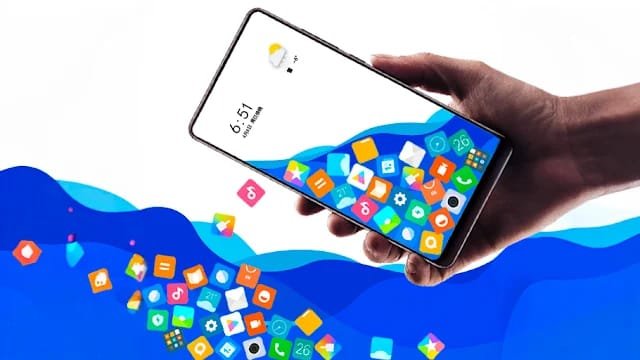

In the world of mobile customization, aesthetic and interactive home screen setups have become a major trend. Among the vast collection of customization apps, the Rolling Icon App stands out for its unique and fun approach. It transforms your regular app icons into gravity-affected, rolling elements that move around your screen and even interact with your wallpaper or touch gestures. Whether you’re someone who loves playful interfaces or simply wants to try something new on your Android device, the Rolling Icon App and Photo feature delivers a delightful user experience. This article provides a detailed guide on what the app is, how it works, and why it’s gaining popularity across customization enthusiasts.
What is the Rolling Icon App and Photo?
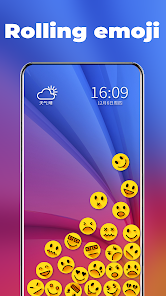
The Rolling Icon App is a mobile customization app primarily designed for Android devices that turns your static app icons into rolling, bouncing, or moving objects that interact with the home screen environment. These icons behave as if they are physical objects affected by gravity, rolling around as you tilt your device or swipe across the screen.
The “Photo” part of the app refers to the customizable background or wallpaper image, which can be personalized with your own pictures. Some versions of the app allow app icons to interact with your photo, creating a visual 3D rolling effect on top of your chosen background.
Key Elements of the App:
Turns regular app icons into dynamic, rolling objects
Icons can bounce off each other or walls
Fully customizable background image (photo or live wallpaper)
Works with most Android devices (some mods or limited versions may work on iPhone using third-party launchers)
How Rolling Icon App and Photo Works
To use the Rolling Icon App and Photo features, follow these steps:
Step 1: Download and Install
Visit the Google Play Store and search for “Rolling Icon – App Icon Simulator”
Choose the app with good reviews (there are many clones; the most popular one is by ZipoApps or Smart Launcher Lab)
Install it on your device.
Step 2: Set Up Your Home Screen
Open the app.
Grant necessary permissions (overlay, usage data, etc.).
Select the apps you want to appear as rolling icons.
Choose your preferred wallpaper or photo from the gallery.
Customize settings like icon size, speed, bounce effect, and gravity sensitivity.
Step 3: Activate the Launcher or Live Wallpaper
You can use Rolling Icon as a launcher replacement or just as a live wallpaper overlay.
Set the rolling effect as your home screen.
Start interacting — tilt your phone, swipe, and watch icons move!
Step 4: Additional Customization
Enable 3D effects, icon trails, vibration on collision, or floating widgets.
You can also enable background music or sound FX in some modded versions.
Features of Rolling Icon App and Photo [Completely Detailing]
| Feature | Description |
|---|---|
| Rolling & Bouncing Icons | App icons move and collide with each other like physical balls based on screen tilt or swipe gestures. |
| Custom Photos as Background | Use any image from your gallery as the wallpaper behind rolling icons. |
| Gravity Simulator | Simulates real-world physics; icons fall based on tilt and motion. |
| Interactive Touch Effects | Icons react when you touch them — bounce off, vibrate, or glow. |
| Launcher Support | Can act as a launcher or be integrated into your current launcher as a live wallpaper. |
| Icon Customization | Choose specific apps, change icon size, add shadows, and adjust bounce power. |
| Battery Saver Mode | Optimized animation and background usage to reduce battery consumption. |
| Icon Trail Effects | Add trails or particle effects behind icons as they move. |
| Realistic 3D Physics Engine | Enhances realism of movement with physics-based motion algorithms. |
| Music and Sound FX | Some versions let you add background music or sound effects when icons collide or move. |
| Widget Compatibility | Some apps allow widgets to stay in place while icons roll around them. |
| Smooth Performance | Built to work smoothly on mid-range Android devices without lag. |
| Pros | Explanation |
|---|---|
| Fun and Unique UI | Brings a playful experience unlike traditional static home screens. |
| Highly Customizable | From icon size to gravity strength and photo background — fully adjustable. |
| Lightweight App | Consumes very little storage and RAM, runs smoothly on most devices. |
| No Root Required | Works on standard Android without needing root access. |
| Free Version Available | Basic functionality is available without needing to pay. |
| Great for Kids and Entertainment | Children especially love watching icons bounce around. |
| Adds Motion and Personality | Makes your phone stand out from typical flat UIs. |
| Interactive Physics Engine | Realistic effects that mimic gravity and collision. |
| Cons | Explanation |
|---|---|
| May Drain Battery Slightly More | Constant motion effects and animations may increase battery usage. |
| Not for Minimalist Users | Users who prefer clean, quiet interfaces may find it too busy. |
| Can Lag on Old Devices | Low-end phones might face performance drops or delays. |
| Not Available for iOS Natively | iPhone users must jailbreak or use alternative apps (limited functionality). |
| Contains Ads in Free Version | Frequent ads unless upgraded to premium. |
| May Clash with Widgets or Shortcuts | Some widgets may not play well with rolling icon overlays. |
| App Name | Platform | Key Features |
|---|---|---|
| 3D Live Wallpaper | Android | Live wallpaper engine with 3D effects and rolling animations. |
| Gravity Launcher | Android | Launcher with gravity simulation for apps, like rolling icon. |
| Nova Launcher + KWGT | Android | Use Nova with KWGT widgets to simulate unique animations. |
| Live Wallpaper Maker – Zedge | Android/iOS | Lets you create live wallpapers; limited movement but highly customizable. |
| Total Launcher | Android | Fully customizable launcher that can mimic rolling icons through scripting. |
| Magic Fluids Live Wallpaper | Android | Not icon-based, but great animated wallpaper alternative. |
| Lawnchair Launcher | Android | Lightweight customizable launcher; doesn’t have icon roll but great UI changes. |
| iOS Jailbreak Themes (Winterboard) | iOS | Allows iPhone users to use advanced home screen animation with icon themes (jailbreak only). |
The Rolling Icon App and Photo feature brings a refreshing twist to smartphone customization. It’s more than just aesthetic; it turns your phone into an interactive playground. By blending real-time physics, motion effects, and personal photos as dynamic backgrounds, the app creates a playful and personalized experience.
Whether you’re bored of the traditional grid layout or looking to impress friends with a unique screen, the Rolling Icon App delivers an engaging experience that’s both functional and fun. It’s ideal for tech enthusiasts, kids, or anyone who enjoys a bit of creativity in their daily tech usage.
For Android users, the experience is seamless and full-featured. iPhone users, however, will need to explore alternatives or wait for similar apps to enter the App Store — but the concept is growing, and more developers are picking up the trend.
Conclusion
The Rolling Icon App and Photo combination isn’t just a novelty — it’s a step towards interactive UI experiences. With rich features, gravity-based motion, and full customizability, it’s a standout in the customization world. Despite some limitations like battery usage or lack of native iOS support, its benefits outweigh the drawbacks for those who want to add a fun and personal touch to their device.