
In today’s digital world, personalization is everything. Whether it’s ringtones, wallpapers, or widgets, smartphone users are constantly looking for ways to make their devices uniquely theirs. One area that often goes untouched is the call screen—but what if you could customize even that? With apps like True Phone Dialer and Contact, you can now add your own picture to the call screen background, blending functionality with personal flair.
This article explores everything you need to know about the True Phone Dialer and Contact app, especially focusing on its feature that lets users set a custom image on their calling screen. We’ll walk through what the app is, how it works, its full set of features, pros and cons, and even provide alternatives for comparison.
What is the True Phone Dialer and Contact – Add Your Picture On Call Screen Background?
True Phone Dialer & Contacts is a third-party Android dialer app designed to replace your default phone dialer. It enhances calling, contact management, and caller ID experience by offering more customization options, improved usability, and advanced features not available in the standard dialer.
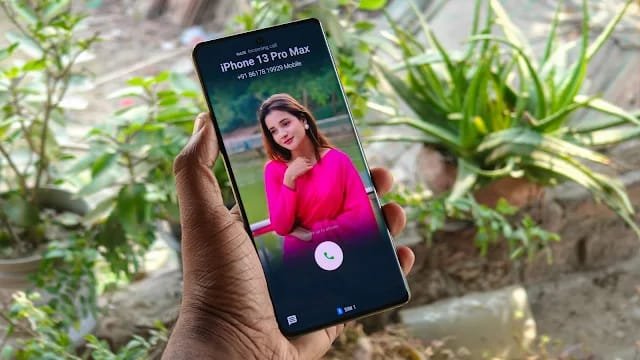
One standout feature is the ability to add a custom picture as the background during calls—either for all calls or for specific contacts. This means you can personalize your call interface by displaying your favorite image, selfie, family photo, or even creative artwork behind the call screen.
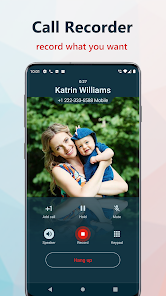
Core Highlights:
Replaces the stock dialer with a sleek, intuitive interface.
Allows adding photos as call screen background.
Includes smart contact search, dual SIM support, and T9 dialing.
Offers caller ID customization, call logs, and backup.
How True Phone Dialer and Contact – Add Your Picture On Call Screen Background
Using this app is straightforward, even for first-time users. Here’s a step-by-step guide to get started with installing and customizing your call screen background image:
Step 1: Install the App
Visit the Google Play Store and search for “True Phone Dialer & Contacts”.
Download and install the app on your Android device.
Step 2: Set It As Default Dialer
Upon launching the app, you’ll be prompted to set it as the default phone and contact app.
Grant all the necessary permissions (calls, contacts, overlay, etc.).
Step 3: Add Your Picture to Call Screen
Go to the app’s Settings > Call Interface.
Tap on Call Background Image or Customize Call Screen.
Choose from:
Default wallpapers
Uploading your own image from the gallery
Assigning images to individual contacts
Crop, adjust brightness, or blur for better visual effect.
Step 4: Save and Apply
Once your customization is done, save the settings.
The new image will appear every time you make or receive a call.
Features of True Phone Dialer and Contact – Add Your Picture On Call Screen Background [Completely Detailing]
| Feature | Description |
|---|---|
| Custom Call Background | Add your own image as the background for incoming/outgoing calls. |
| Contact-Based Image Assignment | Set different images for different contacts. |
| Modern Call Interface | Sleek and user-friendly call interface with visual enhancements. |
| Dual SIM Management | Compatible with dual SIM devices for easy management. |
| T9 Smart Dialing | Intelligent number and name dialing using the T9 predictive input. |
| Speed Dial | Quickly call your favorite contacts with a single tap. |
| Advanced Contact Management | Group contacts, merge duplicates, and import/export easily. |
| Call History Logs | Smart call log manager with filtering and search functions. |
| Dark and Light Themes | Supports multiple UI themes, including AMOLED dark mode. |
| In-Call Tools | Easy access to speaker, mute, hold, and keypad during calls. |
| Caller ID and Blocklist | Shows caller identity and allows you to block unwanted numbers. |
| Backup and Restore | Backup contacts and call logs to Google Drive or local storage. |
| No Ads in Premium | Ad-free experience with premium version. |
Pros of True Phone Dialer and Contact – Add Your Picture On Call Screen Background [Use Table]
| Pros | Details |
|---|---|
| Highly Customizable | Offers complete control over how your call screen looks. |
| User-Friendly Interface | Intuitive design, better than default dialers. |
| Low Storage Requirement | Lightweight, efficient, and doesn’t drain battery. |
| Dual SIM Support | Seamless integration for devices with multiple SIM cards. |
| Enhanced Caller ID | Provides detailed information and blocking tools. |
| Theme Options | Light/dark modes and custom color schemes. |
| Smart Dialing | Faster contact search with T9 input. |
| Image per Contact Option | Add different photos for different people for easy identification. |
| Call Log and Contact Tools | Helps clean, merge, and backup your contacts easily. |
| No Root Required | Works on all modern Android devices without root access. |
Cons of True Phone Dialer and Contact – Add Your Picture On Call Screen Background [Use Table]
| Cons | Details |
|---|---|
| Android Only | Not available for iOS users. |
| Permissions Required | Needs access to sensitive areas (contacts, calls). |
| Ads in Free Version | Some ads may appear unless you upgrade to premium. |
| Not Default in Some Skins | Might conflict with heavily skinned OEMs like MIUI or ColorOS. |
| Incompatible with Some Features | May not fully support VoWiFi or VoLTE features in certain regions. |
| Manual Setup Needed | Customizing image backgrounds takes extra steps. |
| Occasional Bugs | App updates may cause rare glitches or call log issues. |
| Limited Caller ID Database | Not as powerful as dedicated spam call identification apps. |
True Phone Dialer and Contact – Add Your Picture On Call Screen Background Alternatives [Use Table]
If you’re looking for similar apps, here are the best alternatives with comparable or additional features:
| App Name | Key Features | Platform | Free/Paid |
|---|---|---|---|
| Eyecon Dialer | Photo-based caller ID, sync with social media, call screen customization | Android | Free (In-app purchases) |
| Drupe | Caller ID, in-call recording, contact bubble UI | Android | Free (Ads) |
| Truecaller | Global caller ID, spam blocking, call themes | Android, iOS | Free / Premium |
| Full Screen Caller ID | Full image display on call screen, video ringtone support | Android | Free / Paid |
| CallApp | Custom themes, video ringtones, smart dialer | Android | Freemium |
| Simple Contacts Pro | Privacy-focused contact and dialer management | Android | Paid |
| Dialer One | Smart T9 dialer with themes and backup tools | Android | Free |
| Vani Dialer | Stylish dialer with voice command and background themes | Android | Free (In-app) |
True Phone Dialer and Contact – Add Your Picture On Call Screen Background
The ability to personalize your call screen isn’t just a visual treat—it’s also functional. Seeing a favorite image, a loved one’s photo, or your favorite aesthetic design each time you receive a call adds a sense of identity and joy to a usually mundane process.
In addition to image customization, the app’s full dialer capabilities make it a strong contender for replacing the native Android dialer. It strikes a perfect balance between style and utility, making it appealing for both everyday users and tech enthusiasts.
If you value both personalization and productivity, True Phone Dialer and Contact deserves a place on your smartphone.